Troubleshooting
This page lists common problems. For each problem, it gives the cause and the fix.
Sign-in and access
| What you see | Cause | What to do |
|---|---|---|
| The email or password did not match. Try again, reset your password, or sign in with a magic link. | The email address or the password is wrong. | Type both again. Select Forgot password? to reset the password, or use Magic link. |
| This link is no longer valid. Request a new link. | A magic link or a reset link works one time, and it expires. A magic link expires after 10 minutes. | Select Request a new link, and open the new link at once. |
| Too many attempts. Try again in 1 minute. | kmem limits sign-in attempts. | Wait for the time in the message, then try again. |
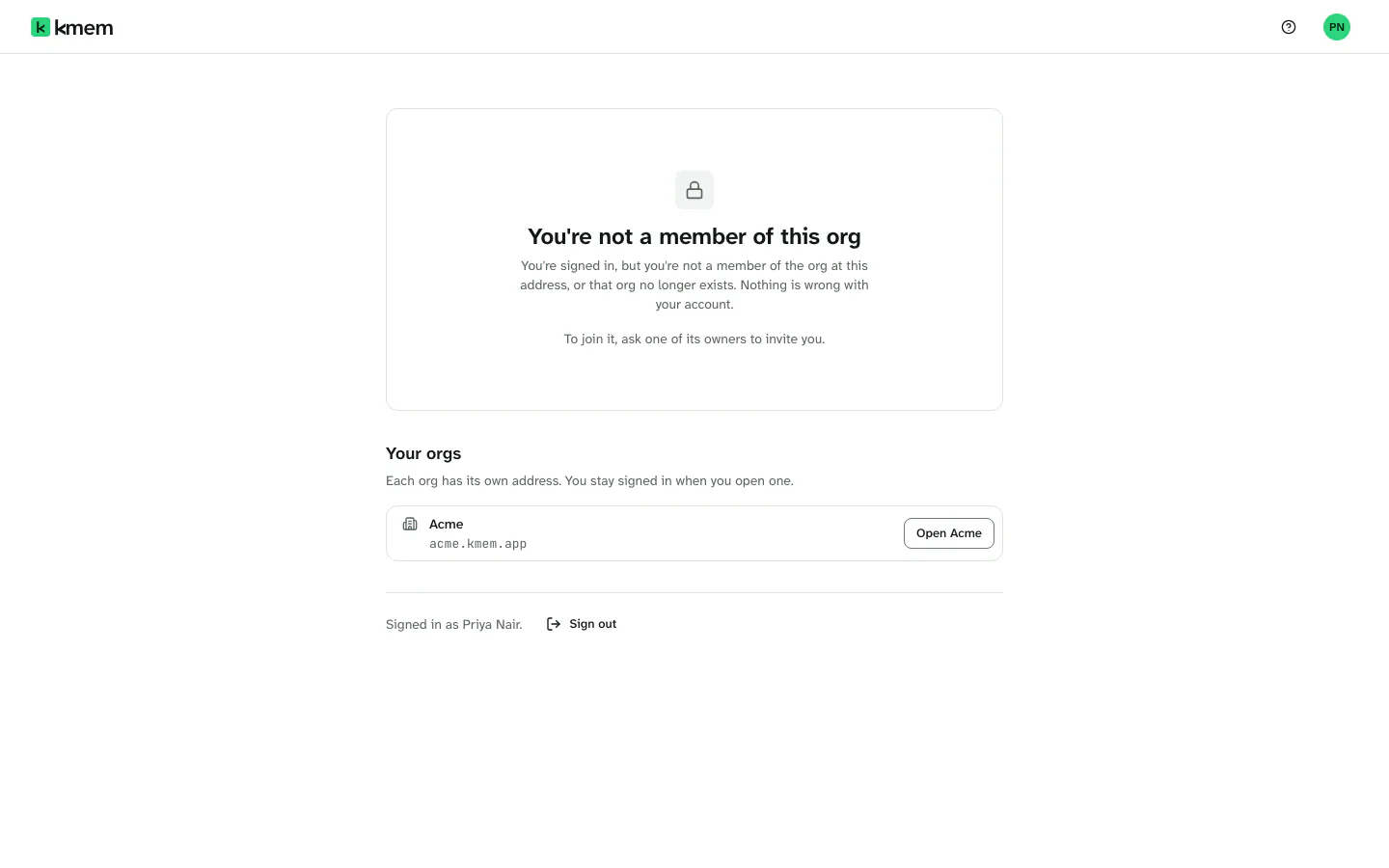
| You're not a member of this org | You are signed in, but you are not a member of the org at this address. Or the org no longer exists. | Open one of your orgs from the list on the page. To join this org, ask one of its owners to invite you. |
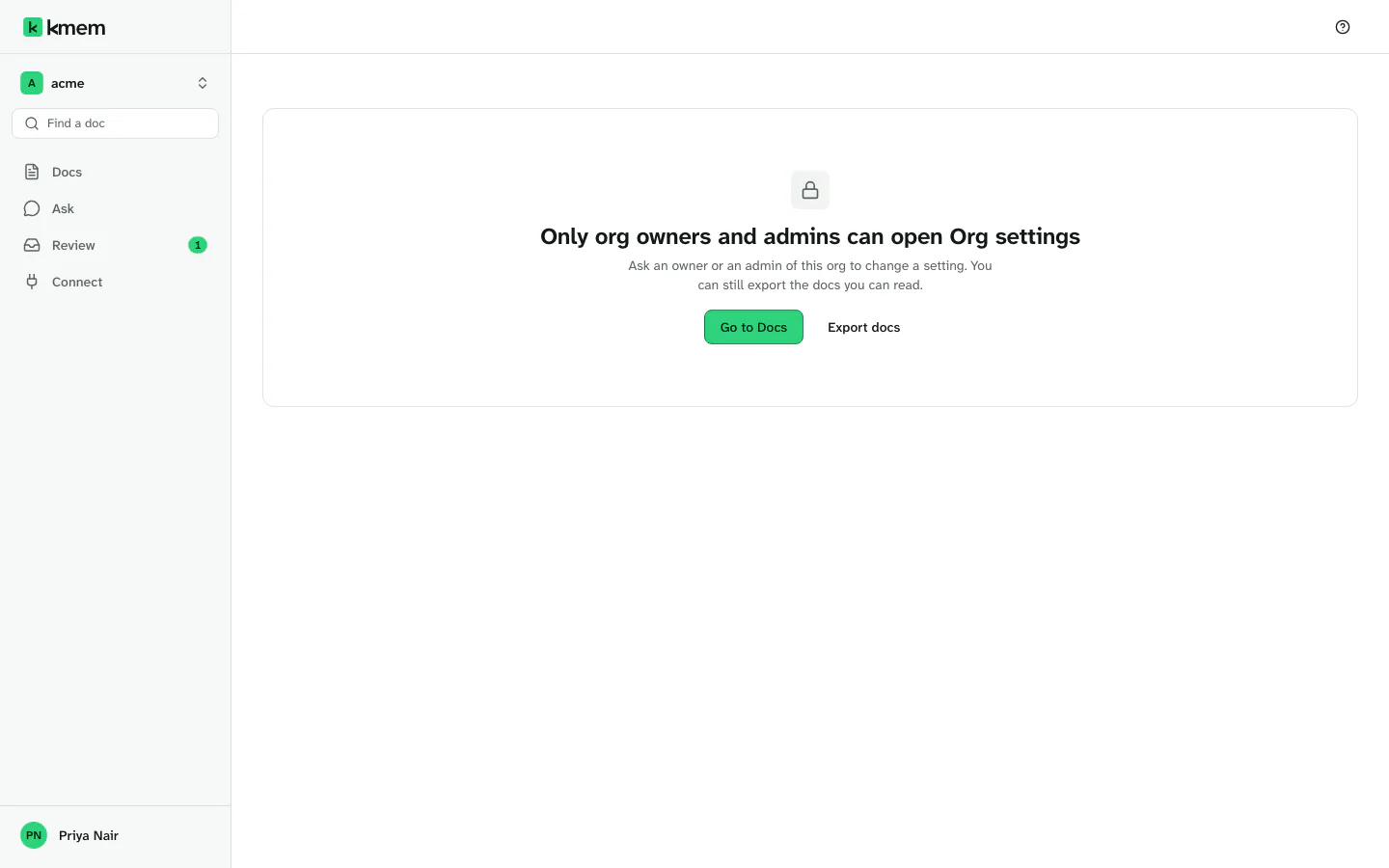
| Only org owners and admins can open Org settings | Your role is member. | Ask an owner or an admin to change the setting. You can still select Export docs. |
| You do not have access to this page | Your role does not allow this page. | Ask an org admin for access, or return to Docs. |
| The invitation page says that the invitation is for another address. | Your browser is signed in to a different account. | Sign out from the account menu. Then open the invitation link again. |
| "This invitation has expired" | An invitation expires after 7 days. | Ask the person who invited you to resend the invitation. |
| Your session has expired. Sign in again to continue. | Your sign-in session ended. | Sign in again in the panel. Your screen stays as it is. |
This page could not be found at kmem.app/browse | Docs live at the address of your org, not at kmem.app. | Select Open the org list, then open your org. |
Agents and connections
| What you see | Cause | What to do |
|---|---|---|
| The agent gets error 401 on every request. | The connection expired or was revoked. Or the person who made it left the org, or an admin removed that person. | Create a new connection. For ChatGPT, Claude and the Gemini web app, connect again from the client. |
| The agent gets error 401 at once, with a new connection. | The token is wrong or incomplete. The header must be Authorization: Bearer and the token. | Copy the setup from Connect again. If you did not copy the token, create a new connection. kmem shows a token only one time. |
Codex says that the environment variable KMEM_TOKEN is not set. | Codex reads the token from KMEM_TOKEN, and the variable is empty in its environment. | Set KMEM_TOKEN in the environment that starts Codex. Open a new terminal, then start Codex again. |
| The agent cannot find a doc that you can see. | The connection reads what the person who made it can read. That person can be somebody else, who is not on the list of a Private doc or folder. | Check the visibility in the Details panel. Read What agents can read. |
| The agent cannot find a new doc. | kmem still indexes the doc. | Wait a few minutes, then ask again. |
| The agent says that it wrote a doc, but the doc is not in Docs. | The change waits in Review. The connection has Read and propose, or Agent writes is off, or the change is a type that always waits. | Open Review, and decide the batch. Read What arrives in Review. |
| The agent cannot propose any change. | The connection has Read only. | Create a connection with Read and propose. |
| Read, propose and write is not available in the form. | Agent writes is off for the org. | Ask an owner or an admin to turn it on. Read Agent writes. |
| A connection row says Made with Read, propose and write. Agent writes are off for this org, so its changes wait in Review. | An owner or an admin turned Agent writes off. | Decide the changes in Review, or ask an owner or an admin to turn the setting on. |
| The connection check stays at Waiting. | The agent did not reach kmem, or it did not read any doc. | Check the endpoint and the token. Send the check prompt again, then select Check connection. |
| No agent request has arrived. Check the endpoint and access method, then try again. | kmem received no request from this connection. | Check that the client uses the endpoint of this org, with /mcp at the end. Start the client again. |
| The agent stops after many writes, and its changes go to Review. | A connection can write directly 25 times in one session. After that, its changes wait in Review. | Decide the changes in Review. |
ChatGPT and Claude
| What you see | Cause | What to do |
|---|---|---|
| ChatGPT has no "Developer mode". | Developer mode needs ChatGPT Plus, Pro, Business, Enterprise or Edu, on the web. On a workspace plan, an admin must allow it. | Ask the admin of your workspace, or use another client. |
| Claude does not let you add another custom connector. | Claude Free allows one custom connector. | Remove another custom connector, or use another plan. |
| Claude Team or Enterprise has no way for you to add kmem. | A Claude owner must add kmem first. | Ask your Claude owner to add kmem under "Connectors" in the admin settings. You can use Quick Connect until then. |
| Claude asks how to register. | Claude supports more than one way to register with a server. | Choose "Register automatically". |
| The approval page says that kmem does not know the return host. | The connection started from a client that kmem does not recognize, or from a bad page. | Allow the connection only if you started it from that host. Otherwise select "Cancel". |
| kmem says that the client or its return address is not registered for this org. | The client registered with another org, or with an old endpoint. | Remove the kmem connector in the client. Add it again with the endpoint of this org. |
| kmem says that the signed-in person is not a member of this org. | You signed in with an account that is not in the org. | Sign out, then sign in with the account that is a member. |
| The client worked, and then stopped. | The connection expired. kmem gives these clients no refresh token. | Connect again from the client. In kmem, the row offers Reconnect in ChatGPT or the name of your client. |
Quick Connect
| What you see | Cause | What to do |
|---|---|---|
| The agent says that it cannot open the URL. | The agent has no web access, or it opens URLs in a sandbox with no network. | Download the file and attach it. If that fails too, use MCP or another client. |
| The agent answers, but the connection check stays at Waiting. | The agent did not open the URL, and it invented an answer. | Do not trust the answer. Use another client. |
| The URL is not on the screen. | The connection expired or was revoked, so kmem hides the URL. | Select Create another connection. |
| The URL leaked to a shared place. | Anybody with the URL can use the connection. | Revoke the connection at once. Then create a new one. |
| ChatGPT has no Quick Connect choice. | Quick Connect is not reliable in ChatGPT. | Use the sign-in route for ChatGPT. |
Docs and the editor
| What you see | Cause | What to do |
|---|---|---|
| This doc changed elsewhere. Review the latest version before saving. | Another person or an agent saved the doc while you edited it. | Select Use latest version and compare, or Save as a new doc. Read When someone else saved first. |
| We could not save your changes. Your draft is still open. Try again. | The save did not reach kmem. | Select Retry save. To keep a copy, select Download draft. |
| Offline · Draft saved on this device | The connection dropped. | Wait for the connection. kmem saves again when it comes back. |
| This device has unsaved changes to this doc from 10:42. | You left the doc before you saved. | Select Restore changes, or Discard draft. |
| A doc that you expect is not in Docs. | The doc is Private and you are not on its list, or it was deleted, or it moved. | Search with Find a doc. Ask an owner who can open the folder. |
| No doc at engineering/deploy | No doc exists at this address. | Check the address for a typo, or select New doc here. |
| An image shows as a description and a link. | The image is on another website. kmem does not load such images. | Store the image in kmem. Read Add an image. |
| This change removes your access. Add yourself or a group that you are in, or ask an owner to make the change. | The new list does not include you. | Add yourself or one of your groups to the list. |
Import
| What you see | Cause | What to do |
|---|---|---|
| No Markdown or plain text files found. Choose .md or .txt files, or a zip containing them. | The selection has no Markdown or text files. | Choose .md or .txt files, or a zip of them. |
| kmem reads one zip per import. Import this zip on its own. | The selection has more than one zip. | Import each zip on its own. |
| kmem reads a zip on its own. Import these files after the zip. | The selection has a zip and other files. | Import the zip first, then the other files. |
| A file is over the size limit. | One file can be at most 976 KB, and one zip at most 25 MB. | Split the file or the zip, and import the parts. |
| Import limits did not load, so kmem cannot check your files yet. | The page could not read the limits. | Select Try again. |
| The import stopped before every file arrived, so nothing was added. | The connection dropped during the import. | Check the connection, then import again. Your files are still selected. |
| Files show Sent to review. | The files would change existing docs. | Decide the changes in Review, or select Use this file instead. |
Review
| What you see | Cause | What to do |
|---|---|---|
| Accept batch does not work, and kmem asks you to mark changes as compared. | A doc changed after the agent proposed its change. | Read each marked change, and select Mark as compared. Then accept. |
| No change in this batch can be accepted. Reject the batch to take it out of the queue. | No change in the batch can apply to the current docs. | Reject the batch, with a reason. |
| That batch is not in the queue. | Somebody decided the batch, or the link is old. | Open Review to see what waits. |
| You need review access to accept changes. Ask an org admin. | Your access does not allow decisions. | Ask an org admin. |
| We could not confirm the decision. Check its status before trying again. | The connection dropped while kmem saved the decision. | Select Check status before you decide again. |
Ask
| What you see | Cause | What to do |
|---|---|---|
| Not in your docs yet | Your docs do not answer the question. | Select Write it down, and write the answer in a doc. |
| kmem could not search all your docs | Part of the search did not run. | Ask again in a few minutes. |
| kmem is still reading your newest docs. An answer may miss them for a few minutes. | kmem still indexes new docs. | Wait a few minutes, then ask again. |
| Ask needs docs to answer from | The org has no docs that you can read. | Import docs, write a doc, or connect an agent. |
| The answer leaves out a doc that you know. | The doc is superseded, or you cannot open it. | Check the doc and its access. |
Too many requests
kmem limits the number of requests that one connection or one person can send. The limit is 60 requests a minute and 1,000 requests an hour.
| What you see | Cause | What to do |
|---|---|---|
| An agent gets error 429. | The connection sent more than 60 requests in a minute, or more than 1,000 in an hour. | Wait, then try again. Give each agent its own connection. |
| You asked more questions than one person can in a minute. | You sent more than 60 requests in a minute in Ask. | Wait a minute, then ask again. |
| kmem reached the limit on decisions a minute, so it waits 30 seconds and then carries on. | A large batch in Review has many changes. | Wait. kmem continues by itself. |
Get help
If this page does not solve the problem, ask an owner or an admin of your org. They can check the members and the connections. They can also check the review queue and the org settings.
When you ask for help, give these facts:
- The address of your org, for example
acme.kmem.app. - The page where the problem happened.
- The exact message that kmem showed.
- For an agent, the name of the connection and the name of the client.
Never send a token or a Quick Connect URL in a help request.
If an owner or an admin cannot solve the problem, write to contact@kmem.app. Give the same facts.