Connect OpenCode
OpenCode reads kmem from its global configuration file. You add kmem once, and every project can then use it.
The Connect screen marks OpenCode Not yet tested with kmem. The steps on this page come from the OpenCode documentation.
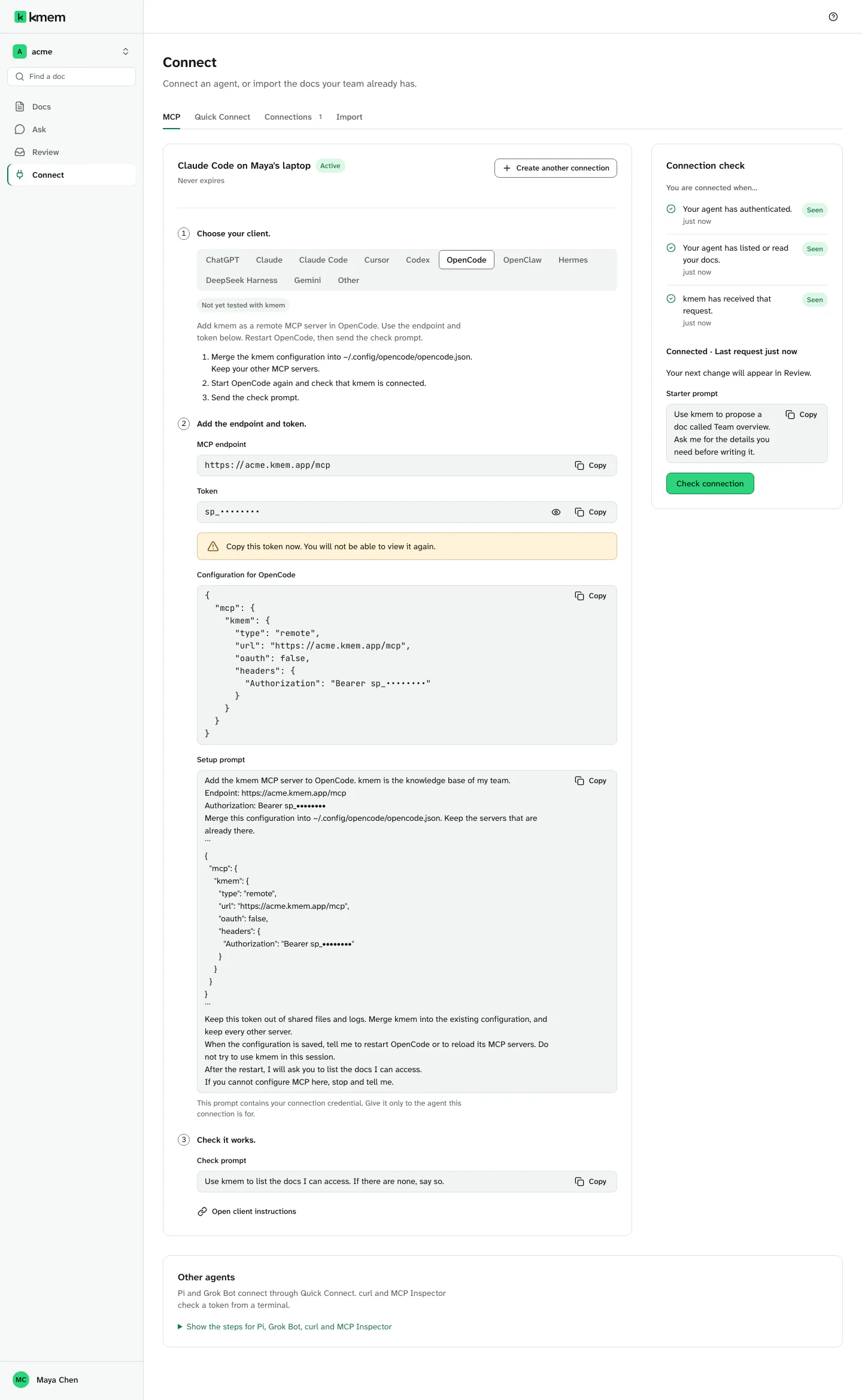
Create a connection
- In kmem, select Connect. The MCP tab opens.
- Select OpenCode in the list of clients.
- Check the New connection form. kmem fills in a name, for example "OpenCode · Maya · 8 Oct". You can change it.
- Select Create connection.
Create a connection explains each field. Copy the token now. kmem shows it only one time.
Merge the configuration
OpenCode keeps its global configuration in the file ~/.config/opencode/opencode.json.
- Under Configuration for OpenCode, select Copy configuration.
- Open
~/.config/opencode/opencode.jsonin a text editor. If the file does not exist, create it. - Merge the kmem configuration into the file:
- If the file is empty or new, paste the whole configuration.
- If the file already has an
mcpsection, add only theacme-kmementry inside it. Keep your other MCP servers. - Keep the other settings of the file as they are.
- Save the file.
The configuration looks like this:
{
  "mcp": {
    "acme-kmem": {
      "type": "remote",
      "url": "https://acme.kmem.app/mcp",
      "oauth": false,
      "headers": {
        "Authorization": "Bearer YOUR_TOKEN"
      }
    }
  }
}
Replace acme with your org's subdomain, in the server name and in the endpoint. Replace YOUR_TOKEN with the token of your connection. The Connect screen fills in these values for you.
The server name is <your-org>-kmem, for example acme-kmem. Each org has its own server name, so one computer can hold the kmem of more than one org.
Do not put kmem in a project file of OpenCode. A team can commit a project file to a shared repository, and the file would then show your token.
Start OpenCode again and check
- Start OpenCode again. OpenCode reads the configuration when it starts.
- Check that acme-kmem is connected.
- Send the check prompt:
Use kmem to list the docs I can access. If there are none, say so.- In kmem, select Check connection. The three checks must show Seen.
If acme-kmem is not connected, check these points:
- The file is valid JSON.
- The
urlends with/mcp. - The token belongs to an active connection.
Why the configuration turns off OAuth
OpenCode can try to sign in to a remote MCP server with OAuth. kmem offers OAuth sign-in too, but this configuration uses a token. The line "oauth": false tells OpenCode to use only the Authorization header. Without it, OpenCode can try a sign-in that you do not need.
Keep the line in the configuration.