Connect Codex
Codex reads kmem from its configuration file, and it reads the token from the KMEM_TOKEN environment variable.
kmem has tested this route with Codex.
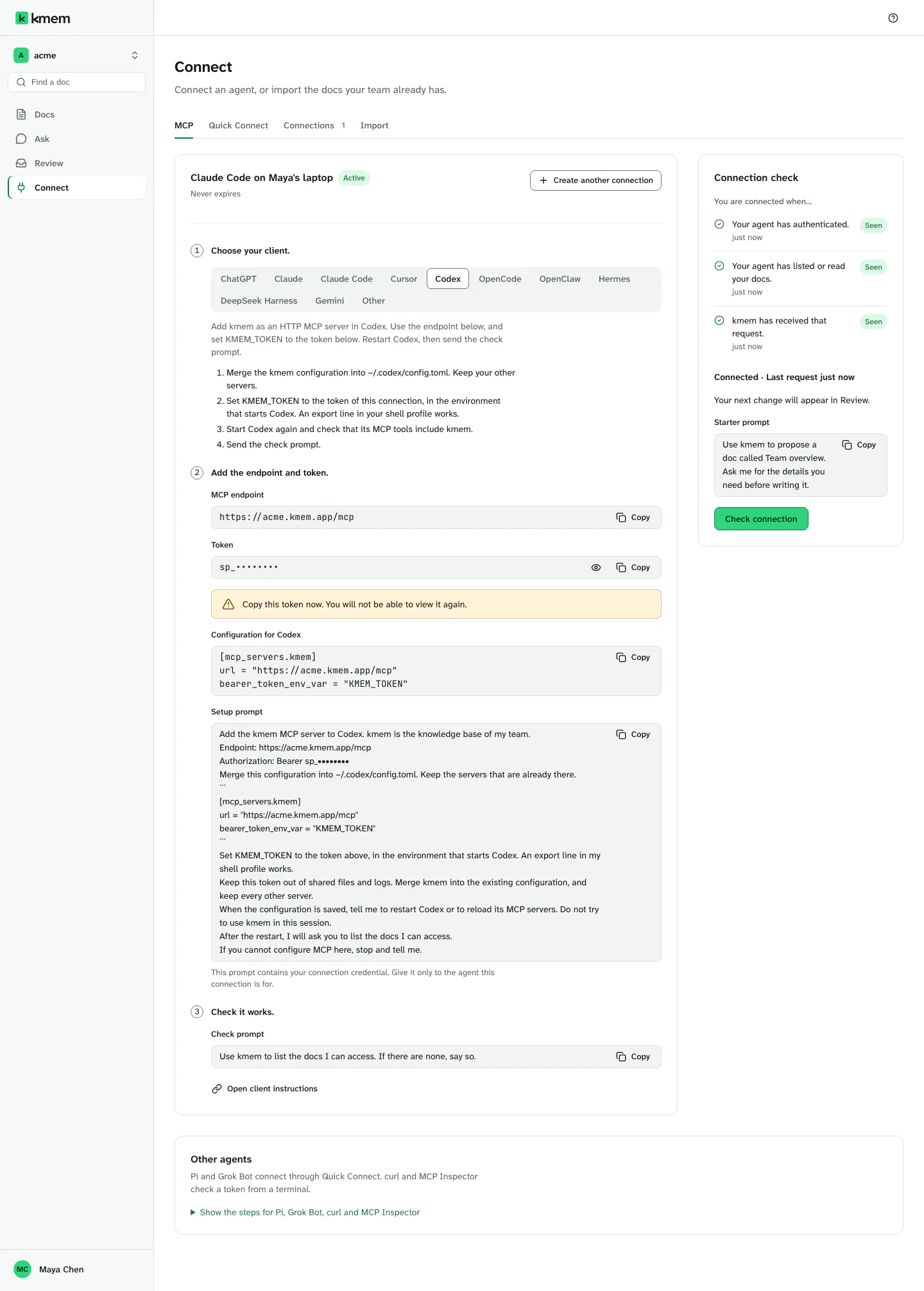
Create a connection
- In kmem, select Connect. The MCP tab opens.
- Select Codex in the list of clients.
- Check the New connection form. kmem fills in a name, for example "Codex · Maya · 8 Oct". You can change it, for example to "Codex nightly checks".
- Select Create connection.
Create a connection explains each field. Copy the token now. kmem shows it only one time.
Merge the configuration
Codex keeps its MCP servers in the file ~/.codex/config.toml.
- Under Configuration for Codex, select Copy configuration.
- Open
~/.codex/config.tomlin a text editor. If the file does not exist, create it. - Add the kmem section at the end of the file. Keep your other servers.
- Save the file.
The configuration looks like this:
[mcp_servers.acme-kmem]
url = "https://acme.kmem.app/mcp"
bearer_token_env_var = "KMEM_TOKEN"
Replace acme with your org's subdomain, in the server name and in the endpoint. The Connect screen fills it in for you.
The server name is <your-org>-kmem, for example acme-kmem. Each org has its own server name, so one computer can hold the kmem of more than one org.
The configuration holds no token. The line bearer_token_env_var tells Codex to read the token from the variable KMEM_TOKEN.
Set KMEM_TOKEN
Set KMEM_TOKEN to the token of your connection, in the environment that starts Codex.
- Open the profile file of your shell, for example
~/.zshrcor~/.bashrc. - Add this line, with your token in place of YOUR_TOKEN:
export KMEM_TOKEN="YOUR_TOKEN"- Save the file.
- Open a new terminal. The new terminal reads the profile file and gets the variable.
If you start Codex from an app and not from a terminal, set the variable where that app gets its environment.
Keep the profile file private. Do not commit it to a shared repository.
Check the connection
- Start Codex again.
- Check that the MCP tools of Codex include acme-kmem.
- Send the check prompt:
Use kmem to list the docs I can access. If there are none, say so.- In kmem, select Check connection. The three checks must show Seen.
If Codex cannot reach kmem, check these points:
- The terminal that starts Codex has a value in
KMEM_TOKEN. Runecho $KMEM_TOKENto see the value. - The token belongs to an active connection.
- The
urlends with/mcp.
Add kmem with a command instead
Codex can also add the server with a command. The command writes the same section to ~/.codex/config.toml:
codex mcp add acme-kmem --url https://acme.kmem.app/mcp --bearer-token-env-var KMEM_TOKENReplace acme with your org's subdomain, in the server name and in the endpoint. You still need to set KMEM_TOKEN.