Manage org settings
Org settings hold the org details, the Agent writes and Verification settings, and export. Owners and admins can change them.
Who can open org settings
Only owners and admins of the org can open org settings.
- Open the org menu. Select the name of the org.
- Under This org, select Org settings.
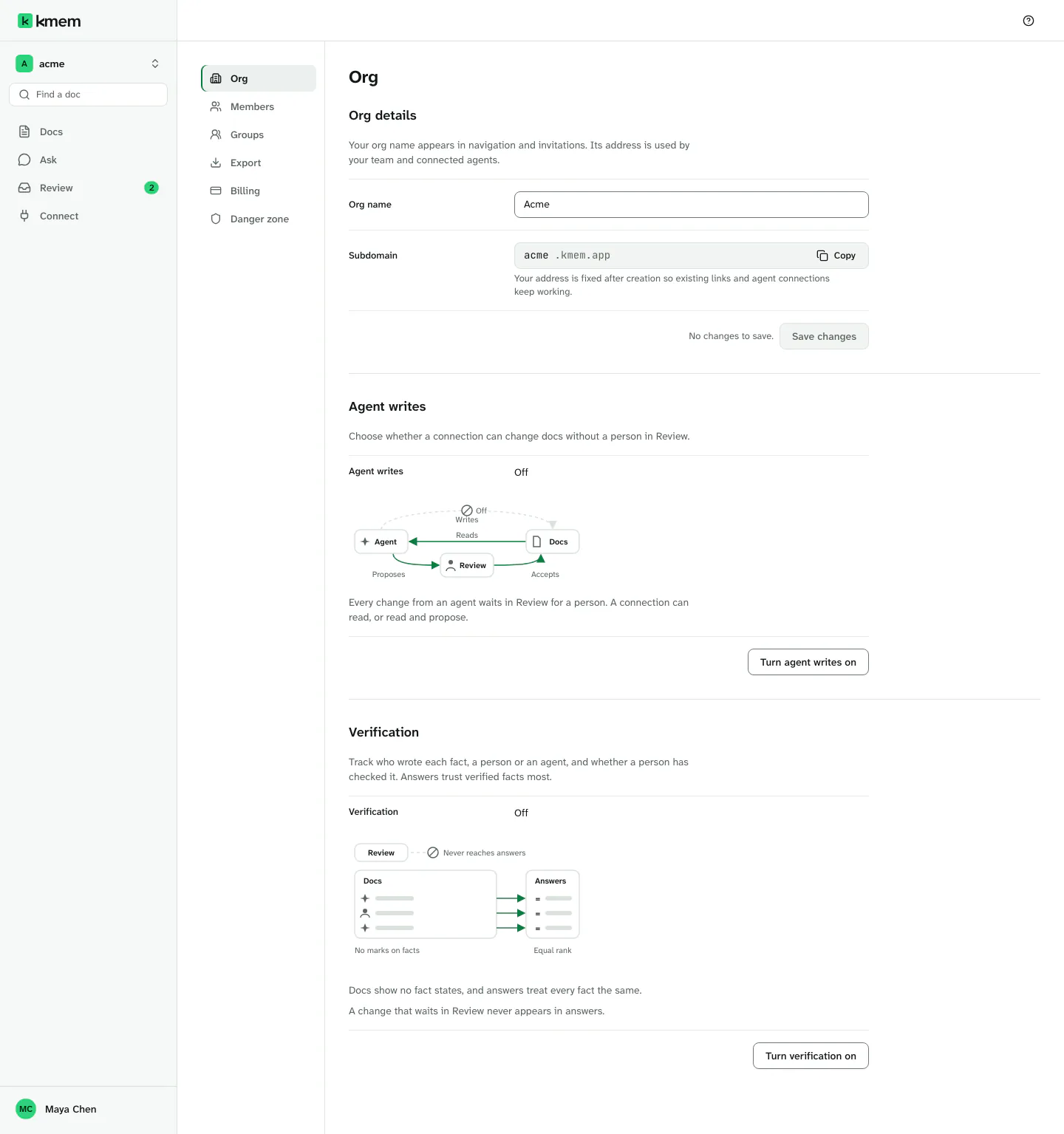
The settings have a list of pages on the left:
| Page | What it holds | Who can open it |
|---|---|---|
| Org | The org details, Agent writes and Verification | Owners and admins |
| Members | The members and the invitations. Read Manage members and groups. | Owners and admins |
| Groups | The groups of the org | Owners and admins |
| Export | Export of docs | Every member |
| Danger zone | Deletion of the org | Owners and admins can open it. Only an owner can delete the org. |
A member who is not an owner or an admin sees no Org settings row in the org menu. If a member opens a settings address, kmem says Only org owners and admins can open Org settings. The page offers Export docs, because every member can export the docs that they can read.
Select Back to Docs to leave the settings.
The Org page shows three sections, one under the other: Org details, Agent writes and Verification. Each setting shows its current value, a diagram and what the value means. The button that changes the setting is at the end of its own row.
Org details
The Org details section holds the name and the address of the org.
- In Org name, type the new name. The name appears in the navigation and in invitations.
- Select Save changes.
kmem says Org updated.
Subdomain shows the address of the org. You cannot change it. Existing links and agent connections use the address, so kmem keeps it fixed. Select Copy address to copy the address.
Agent writes
Agent writes decides if a connection can change docs without a person in Review.
| Value | What happens |
|---|---|
| Off | Every change from an agent waits in Review for a person. A connection can read, or read and propose. |
| On | A connection made with Read, propose and write can add docs and edit them directly. Deletions and edits to an older version still wait in Review. |
To turn it on:
- Select Turn agent writes on.
- Read the dialog Turn agent writes on?. It says how many active connections were made with Read, propose and write. Those connections start to change docs directly when you turn the setting on.
- Select Turn on. Select Cancel to keep the setting off.
kmem says Agent writes are on.
To turn it off, select Turn agent writes off. kmem says Agent writes are off. Every change from an agent now waits in Review. The change applies to the next request of each agent. kmem does not change the mode of any connection. A connection made with Read, propose and write proposes while the setting is off, and writes again when you turn it on.
The doc history keeps every version, and you can undo the changes of a connection in Connect. Read Connect agents.
Verification
Verification tracks who wrote each fact, a person or an agent, and whether a person has checked it. Answers trust verified facts most.
| Value | What happens |
|---|---|
| Off | Docs show no fact states, and answers treat every fact the same. |
| On | Agent text shows Unverified, Accepted or Verified. Person-written text shows Written by or Imported by, and never Unverified. Answers rank verified facts first. Accepted and unverified facts still appear in answers. |
A change that waits in Review never appears in answers.
The diagram under the value shows what the setting does:
- On: agent text shows a state chip. Person-written text shows Written by or Imported by. The answers put the verified fact first, then the accepted fact, then the unverified fact.
- Off: the facts show who wrote them and no chip, and answers give every fact the same rank.
- In both modes, a change in Review stops before the answers.
With verification on, a person with write access can mark a fact Verified, Unverified, Stale or Superseded in the status panel. With verification off, a doc shows no marks and does not open the status panel. Read Accept or verify one fact.
To turn it on, select Turn verification on. To turn it off, select Turn verification off. kmem applies the change at once and asks nothing first, because no doc leaves answers.
When you turn verification off, the docs stop showing all marks, also the Stale and Superseded marks that a person set before. kmem keeps the marks. Stale facts still rank lower, and Superseded facts stay out of answers. The marks show again when you turn verification on.
Verify facts explains the marks and how to verify text.
Export docs
Every member can export the docs that they can read.
- Owners and admins: select Export in the list of settings pages.
- Every member: open the account menu, and select Export docs.
Export docs explains the export.
Delete the org
Only an owner can delete the org. Deletion removes the docs, the pending proposals, the connections and the memberships of the org. You cannot undo it.
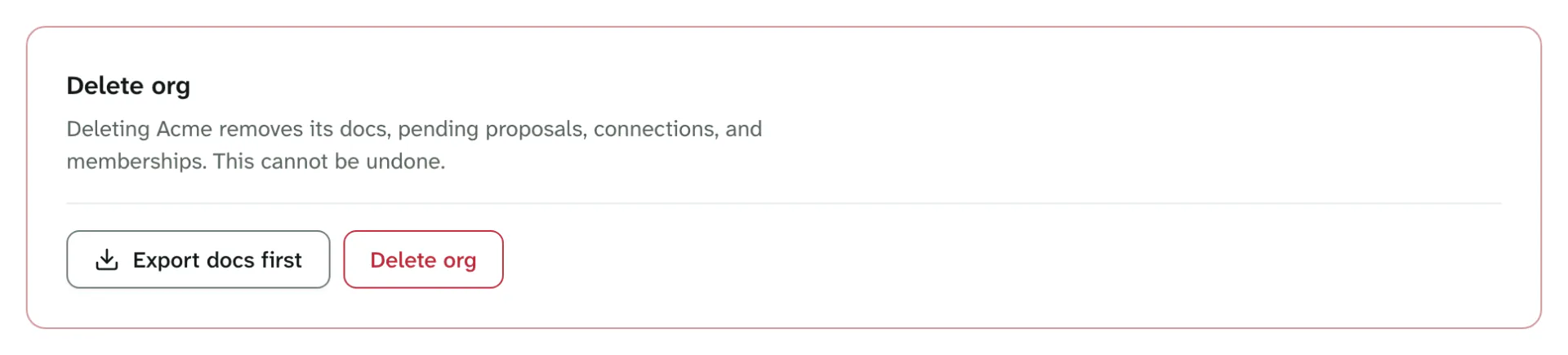
- In the settings, select Danger zone.
- Select Export docs first to download a copy of your docs. kmem says Your docs are downloading.
- Select Delete org.
- In the dialog, type the full address of the org exactly as the dialog shows it, for example
acme.kmem.app. - In Your password, type the password that you sign in with.
- If you sign in with an email link, leave the field empty.
- If you signed in more than ten minutes ago, sign out and sign in again first.
- Select Delete org.
kmem shows Deleting org… and then Org deleted. The org address then serves nothing.
A large org can take more than one step to delete. If kmem says This org still holds docs, proposals or connections. Send the deletion again to continue., select Continue deleting.
If kmem says We could not confirm whether the org was deleted. Check its status before trying again., select Check status before you try again.
If the export stopped at a limit, kmem says so. Export the rest folder by folder on the Export page before you delete the org.